
The Internet
The Internet is the single most impactful invention of the 20th century — more impactful than the automobile or the television, because it contains and accelerates all other technologies.
The Internet is a global network of interconnected computers and communication systems that allows users to share information, access services, and communicate across long distances.
It operates on the standardised protocol TCP/IP (Transmission Control Protocol/Internet Protocol), enabling diverse networks — government, academic, private, commercial — to function as one unified system.
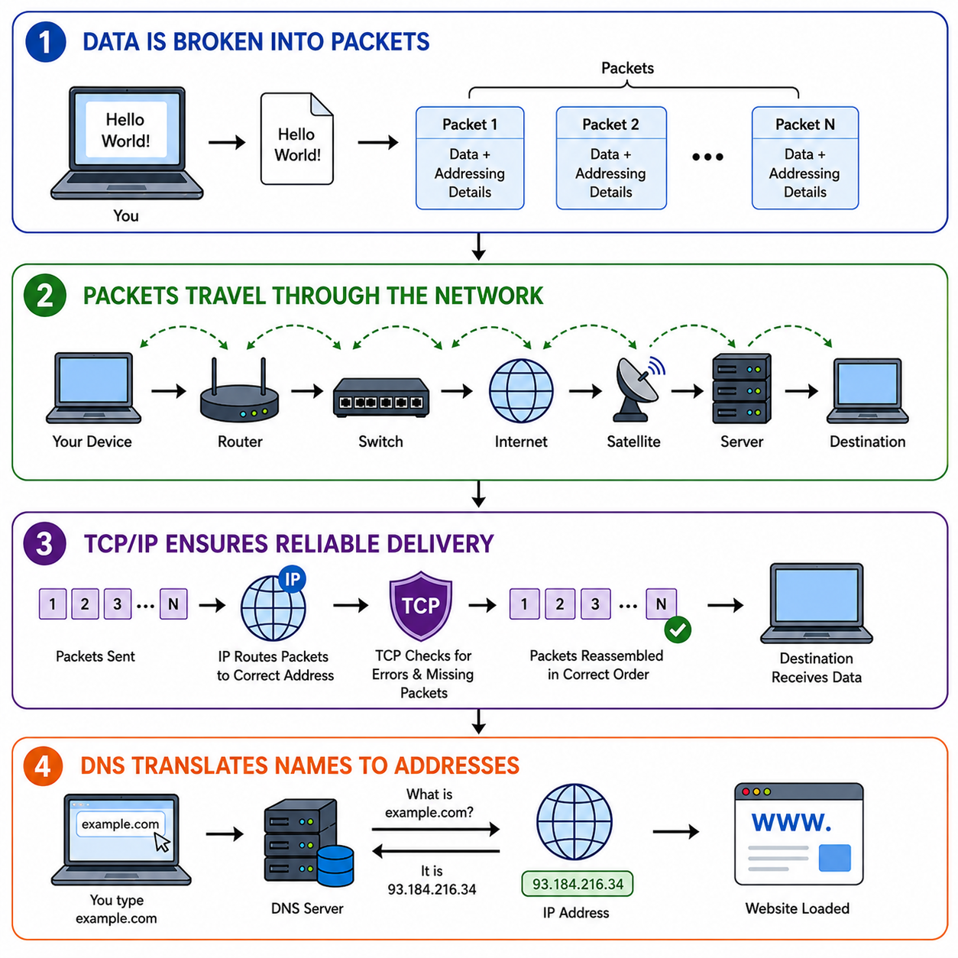
| How the Internet Works — Step by Step (Simplified) |
| STEP 1: DATA IS BROKEN INTO PACKETS — When you send a message or access a website, your data is divided into small units called PACKETS, each containing part of the information + addressing details. STEP 2: PACKETS TRAVEL THROUGH THE NETWORK — These packets move across routers, switches, undersea fibre-optic cables, satellites, and servers — choosing the fastest path to the destination. STEP 3: TCP/IP ENSURES RELIABLE DELIVERY — IP directs packets to the correct address. TCP checks for errors and reassembles packets in the correct order at the destination. STEP 4: DNS TRANSLATES NAMES TO ADDRESSES — The Domain Name System (DNS) converts easy-to-remember website names (like example.com) into numerical IP addresses so computers can find each other. |
Types of Internets — A Complete Classification
Based on Connection Technology
| Technology | Medium | Speed | Mobility | Key Remarks |
| Dial-Up | Copper telephone line | Up to 56 Kbps | No | Oldest form; shares phone line; OBSOLETE today |
| DSL Broadband | Copper telephone line | 2–24 Mbps | No | Always-on; speed decreases with distance from exchange. E.g., BSNL DSL |
| Cable Broadband | Coaxial TV cable | 10–300 Mbps | No | Faster than DSL; shared bandwidth in urban areas |
| Fibre Broadband (FTTH) | Optical fibre | 100 Mbps – 1 Gbps+ | No | Fastest, most reliable; backbone of 4G/5G. E.g., JioFiber, Airtel Xstream Fibre |
| Wireless Broadband (Wi-Max) | Radio links | 10–100 Mbps | Limited | No physical cable; useful where fibre is not feasible |
| Satellite Internet | Satellites (GEO/LEO) | 50–250 Mbps | Limited | Best for remote/rural/disaster areas. LEO (Starlink) offers lower latency than GEO |
| Mobile/Cellular Internet | Cellular towers (2G–5G) | Kbps to 1 Gbps | High | Most widely used in India; speed varies with generation and congestion |
| Fixed Wireless Access (FWA) | Cellular + fixed receiver (CPE) | 50–300 Mbps+ | No | Broadband alternative to fibre; uses 4G/5G towers. E.g., JioAirFiber |
Fibre Optics (Optical Fibre Communication) — Special Focus
Fibre optics is the technology of transmitting data, voice, and video as pulses of light through thin strands of glass or plastic called optical fibres.
Light travels at approximately 200,000 km/s in glass — which is why fibre internet is so extraordinarily fast and reliable. It forms the backbone of the modern Internet.
Why Fibre Optics Provides Superior Internet
- Uses Light Signals (Laser/LED): Light travels at ~200,000 km/s in glass, enabling gigabit to terabit-level data transmission. No electrical signal can match this.
- Very High Bandwidth (WDM): Wavelength Division Multiplexing allows multiple wavelengths of light to travel simultaneously — dramatically increasing capacity. Thousands of users, no congestion.
- Extremely Low Signal Loss (Attenuation): Fibre cables carry data for tens of kilometres without signal boosting. Copper cables need frequent amplification — fibre doesn’t.
- Immune to Electromagnetic Interference (EMI): Unlike copper cables, fibre does not use electricity — so weather, electrical equipment, or cross-talk cannot disturb the signal. Highly stable in noisy environments.
- Higher Security — Difficult to Tap: Fibre cables do not radiate signals. Any attempt to tap the line causes a detectable interruption — making it inherently more secure.
- Lightweight & Environmentally Resistant: Thinner and lighter than copper; resistant to corrosion, temperature fluctuations, lightning, and moisture. Longer lifespan with lower maintenance costs.
- Applications: Telecommunications (broadband, 4G/5G backbone, international internet); Medical (endoscopes, imaging); Industrial/Defence (sensors, military comms); Data centres (high-capacity server-to-storage transfer).
Satellite Internet: Starlink, OneWeb & BSNL VSAT
| Provider | Key Details | India Relevance |
| Starlink (SpaceX / Elon Musk) | Global satellite internet using LEO (Low Earth Orbit) satellites. High speed, low latency. Aims to be world’s largest LEO constellation. | Received final regulatory approval from India’s IN-SPACe in 2025. Will serve remote/rural India with broadband. |
| OneWeb (Bharti Enterprises + UK Government) | Global satellite internet company using LEO satellites. B2B model — partners with telecom operators, ISPs, governments, enterprises. Does NOT sell directly to households. | Strategically important for India’s digital and space ecosystem. Covers remote, maritime, aviation, and defence sectors. |
| BSNL VSAT (Satellite Broadband) | Uses VSAT (Very Small Aperture Terminal) technology — small dish antennas for two-way data/voice/video connectivity. Uses GEO satellites (INSAT/GSAT by ISRO). | Designed for remote, rural, hilly, tribal, border, and island regions where fibre or mobile towers are unviable. |
Intranet vs Extranet vs Public Internet
| Feature | Intranet | Extranet | Public Internet |
| Definition | Private, secure internal network used within an organisation | Controlled extension of intranet for external stakeholders (clients, suppliers, vendors) | Open, global network accessible to anyone |
| Access | Only internal users (employees, members) | Authorised external users + internal users | Open to general public — no authentication needed |
| Security Level | Very high | High (controlled access via VPN, digital certificates) | Comparatively lower |
| Data Sensitivity | Highly sensitive internal data | Semi-sensitive shared data | Publicly available information |
| Examples | Company HR portal, internal emails, ERP systems | Supplier portals, B2B portals, logistics tracking | Google, YouTube, Wikipedia, UPI apps |
| Purpose | Internal communication and operations | Collaboration beyond the organisation | Information sharing, communication, global services |
Based on Speed Category: Narrowband vs Broadband vs Ultra-Broadband
| Aspect | Narrowband | Broadband | Ultra-Broadband |
| Speed | Up to ~64 Kbps | ≥ 2 Mbps (TRAI definition for India); ITU: 256 Kbps+ | 100 Mbps to several Gbps |
| Technology | Dial-up, ISDN | DSL, Cable, Fibre, 4G | FTTH, 5G, DOCSIS 3.1 |
| Use Cases | Basic emails, text data only | Streaming, e-governance, video calls | 4K/8K streaming, AI, IoT, smart cities |
| Current Status | OBSOLETE | Mainstream (present standard) | Future-ready / advanced (emerging) |
| Indian Context | Legacy systems (rare) | BharatNet, home broadband | 5G rollout, Digital India 2.0 |
| Key Fact: In India, TRAI (Telecom Regulatory Authority of India) defines broadband as ≥ 2 Mbps download speed. The ITU (International Telecommunication Union) defines it as 256 Kbps and above. |
Global Internet Backbone — Submarine Cables
Global internet connectivity is supported by a worldwide network of undersea fibre-optic cables that interconnect continents. These submarine cables carry over 95% of all international internet traffic — they are the true backbone of the global Internet.
Major submarine cable systems connecting India:
- SEA-ME-WE series — South-East Asia–Middle East–Western Europe
- I-ME-WE — India–Middle East–Western Europe
- EIG — Europe India Gateway
- BBG — Bay of Bengal Gateway
Evolution of the Internet: Web 1.0, Web 2.0, Web 3.0
The Internet has not been static — it has evolved through three fundamental phases, each representing a shift in who controls information.
‘Web 1.0 was the era of reading, Web 2.0 of participation, and Web 3.0 of ownership.’ This simple distinction captures the essence.
Web 1.0 — The Static Web (1990s to early 2000s)
| Core Idea: READ-ONLY WEB — Users could only consume information. They had no ability to interact, comment, upload, or customise. Like reading a newspaper — you cannot write in it. |
- Static HTML pages with basic text, fixed content, and hyperlinks
- Minimal interactivity — one-way communication (publisher to users)
- No social media, user-generated content, or online communities
- Slow internet speeds (dial-up) and basic page design
- Content fully controlled by website owners — not users
- Examples: Early Yahoo Directory, MSN, simple company webpages, early online encyclopedias, personal HTML homepages
| HTML (HyperText Markup Language): The standard language for creating and structuring web pages. It defines how text, images, links, and multimedia are displayed in a browser. The foundation of Web 1.0. |
Web 2.0 — The Interactive / Social Web (mid-2000s to present)
| Core Idea: READ-WRITE WEB — Users are no longer passive readers — they are active participants and content creators. You can post, comment, share, and build communities. |
- User-Generated Content (UGC) — posts, videos, blogs, reviews become central
- High interactivity through likes, comments, shares, and online collaboration
- Social media platforms enable sharing, commenting, and community building
- Dynamic and interactive websites using advanced web technologies
- Rise of cloud computing, mobile internet, and applications
- Centralised platforms store and control user data — Big Tech dominance
- E-commerce and digital payment systems integrated into platforms
- Algorithm-based personalisation for feeds, targeted ads, recommendations
Examples: Social media (Facebook, YouTube, Instagram, Twitter/X); Wikipedia; Digital payment apps (PhonePe, GPay); E-commerce (Amazon, Flipkart); Ride-sharing and food delivery apps
| Critical Concerns of Web 2.0: While Web 2.0 democratised content creation and enabled the digital economy, it also raised serious concerns — data privacy violations, misinformation and fake news, and platform monopolies by Big Tech companies who control vast amounts of user data without adequate accountability. |
Web 3.0 — The Decentralised & Intelligent Web (Emerging)
| Core Idea: READ-WRITE-OWN WEB — Users can not only read and create content but also OWN their data, identity, and digital assets. Control shifts from Big Tech platforms to individual users. |
Core Technologies: Blockchain and Distributed Ledger Technology; Artificial Intelligence (AI) and Machine Learning; Smart Contracts; Token Economy and Cryptocurrencies; Semantic Web Technologies
Key Features of Web 3.0
- Decentralisation: Data stored across distributed networks (blockchains) rather than centralised servers. Reduces control of a few large companies over user data.
- User Ownership: Users own digital assets, identity, and data using crypto wallets, tokens, and NFTs (Non-Fungible Tokens). Enables digital ownership and self-sovereign identity.
- Semantic Web: AI enables machines to understand the MEANING of data, not just keywords. Improves search accuracy, personalisation, and intelligent services.
- Interoperability: Applications interact seamlessly across platforms and blockchains — enabling composable and connected digital ecosystems.
- Trustless Systems: Transactions and agreements executed automatically using SMART CONTRACTS — reducing reliance on intermediaries like banks or centralised authorities.
Examples: Blockchain networks (Ethereum, Solana); Decentralised Applications (dApps); NFTs; DAOs (Decentralised Autonomous Organisations) for decentralised governance; Web3-based identity systems; Decentralised Finance (DeFi) platforms
Comprehensive Comparison: Web 1.0 vs Web 2.0 vs Web 3.0
| Feature | Web 1.0 | Web 2.0 | Web 3.0 |
| Nature | Static | Interactive | Decentralised & Intelligent |
| User Role | Read-only (passive consumer) | Read-write (active participant) | Read-write-own (owner of data & assets) |
| Data Control | Website owners | Big Tech platforms (Google, Meta, etc.) | Users themselves (via blockchain) |
| Key Technologies | HTML, basic web protocols | Mobile apps, cloud computing, social media | Blockchain, AI, semantic web, smart contracts |
| Content | Publisher-created, static | User-generated, dynamic | User-owned, decentralised |
| Examples | Early websites, Yahoo Directory, basic company pages | Facebook, YouTube, Instagram, WhatsApp, Flipkart | dApps, NFTs, crypto wallets, DAOs, DeFi platforms |
| Privacy | Limited data collection | Massive data collection by platforms; privacy concerns | User controls own data; enhanced privacy |
| Economy | Early e-commerce | Platform economy, gig economy | Token economy, decentralised finance |
| Internet vs World Wide Web (WWW) — Don’t Confuse! The INTERNET is the global network of computers (infrastructure — hardware, cables, protocols). The WORLD WIDE WEB (WWW) is a system of interlinked documents that RUNS on the Internet (a service). Invented by Tim Berners-Lee in 1989. The Internet uses TCP/IP; the WWW uses HTTP/HTTPS. The Internet also carries email, FTP, VoIP — not just the web. |
Surface Web, Deep Web & Dark Web
| 🧠 Analogy — The Ocean Think of the internet as a vast ocean. The Surface Web is the sunlit zone at the top — visible, teeming with life, accessible to all. The Deep Web is the twilight zone below — not dark or criminal, just private and password-protected. The Dark Web is the deep abyss at the bottom — deliberately hidden, requires special equipment to access, and hosts both legitimate secrets and dangerous illegal activities. |
| 🌐 SURFACE WEB (~5-10% of the Internet) | Publicly accessible | Indexed by Google, Bing |
▼
| 🔒 DEEP WEB (~90% of the Internet) | Not indexed | Requires login / authentication |
▼
| 🕵️ DARK WEB (<1% of the Internet) | Deliberately hidden | Requires special software (Tor, I2P) |
Surface Web
The Surface Web is the portion of the internet that is publicly accessible and indexed by standard search engines. You access it every day — Google, news sites, Wikipedia, e-commerce portals, YouTube. It is searchable, open, and generally legal and regulated.
- Size: Only ~5-10% of the total internet — shockingly small!
- Examples: News websites, government portals (nic.in), Wikipedia, social media public posts, e-commerce sites, educational platforms
- UPSC relevance: Platform for e-governance, digital India services, and public information dissemination
Deep Web
The Deep Web is the part of the internet that is NOT indexed by search engines and cannot be accessed through simple search queries. Critically, it is largely legal and legitimate — it includes your email inbox, online banking, private cloud storage, academic databases, and corporate intranets.
The Deep Web is not the enemy! It exists to protect your privacy — your email should not be searchable on Google!
- Size: ~90% of all internet content
- Requires: Authentication — login IDs, passwords, subscriptions, secure credentials
- Examples: Online banking portals, email inboxes, private social media profiles, academic databases (JSTOR, PubMed), cloud storage (Google Drive, OneDrive), government and corporate intranets
Dark Web
The Dark Web is a small, intentionally hidden part of the internet that can be accessed ONLY using specialised software like Tor (The Onion Router) or I2P. It provides high anonymity by routing traffic through multiple encrypted relays, masking identities and locations.
- Requires: Special browsers (Tor) — impossible to access with regular Chrome or Firefox
- Anonymity: Very high — multiple layers of encryption, like the layers of an onion (hence “Onion Router”)
- Legitimate uses: Protecting privacy for journalists, whistle-blowers, activists in authoritarian regimes, political dissidents
- Illegal uses: Drug and arms trafficking, sale of stolen data, malware, cybercrime-as-a-service, illegal marketplaces
| Basis | Surface Web | Deep Web | Dark Web |
| Definition | Publicly accessible, search engine indexed | Non-indexed, restricted by logins or access controls | Intentionally hidden, requires special software |
| Search Engine Indexing | INDEXED | NOT INDEXED | NOT INDEXED |
| Accessibility | Standard browsers (Chrome, Firefox) | Standard browser + login/password | Special software (Tor, I2P) required |
| Purpose | Information sharing, public services | Privacy, security, restricted access | Anonymity, privacy, secrecy |
| Level of Anonymity | Low | Moderate | Very High |
| Size of Internet | Smallest (~5-10%) | Largest (~90%) | Tiny (<1%) |
| Legality | Mostly legal | Legal | Mixed — legal + illegal activities |
| Cybersecurity Risk | Low to moderate | Moderate (data breaches, privacy) | High (cybercrime, terrorism, illegal trade) |
| Examples | Google, Wikipedia, news sites, YouTube | Email, banking portals, Google Drive, JSTOR | Tor sites, darknet markets, whistle-blowing platforms (SecureDrop) |